Hello everyone,
this will be a continuation or extension or something similar along those lines 🙂 to the post I made a couple of years ago “ArubaOS-CX Static VXLAN Configuration (Part 1)“.
This time, we will configure it, utilizing BGP EVPN. This allows it to be more dynamic and easier to manage in larger networks.
For this, I will prepare a GNS3 Lab using the “ArubaOS-CX Simulation Software” 10.16.1006 and 10.13.1000 images. No particular reason for this, I just want to see if there are major differences. You can use either for everything.
We will create two switches in a VSX cluster and three additional single switches to test the connection. Also, we will add a few clients for the ping tests.
Keep in mind that you actually don’t need the VXLAN configuration on the switch-01 and vsx cluster, since in this example, they don’t participate in the vxlan communication. We technically just need them on the edge switches. But I think this makes it easier to understand, at least for me, and it’s to showcase the setup on a VSX cluster.
The following topology will be the setup.
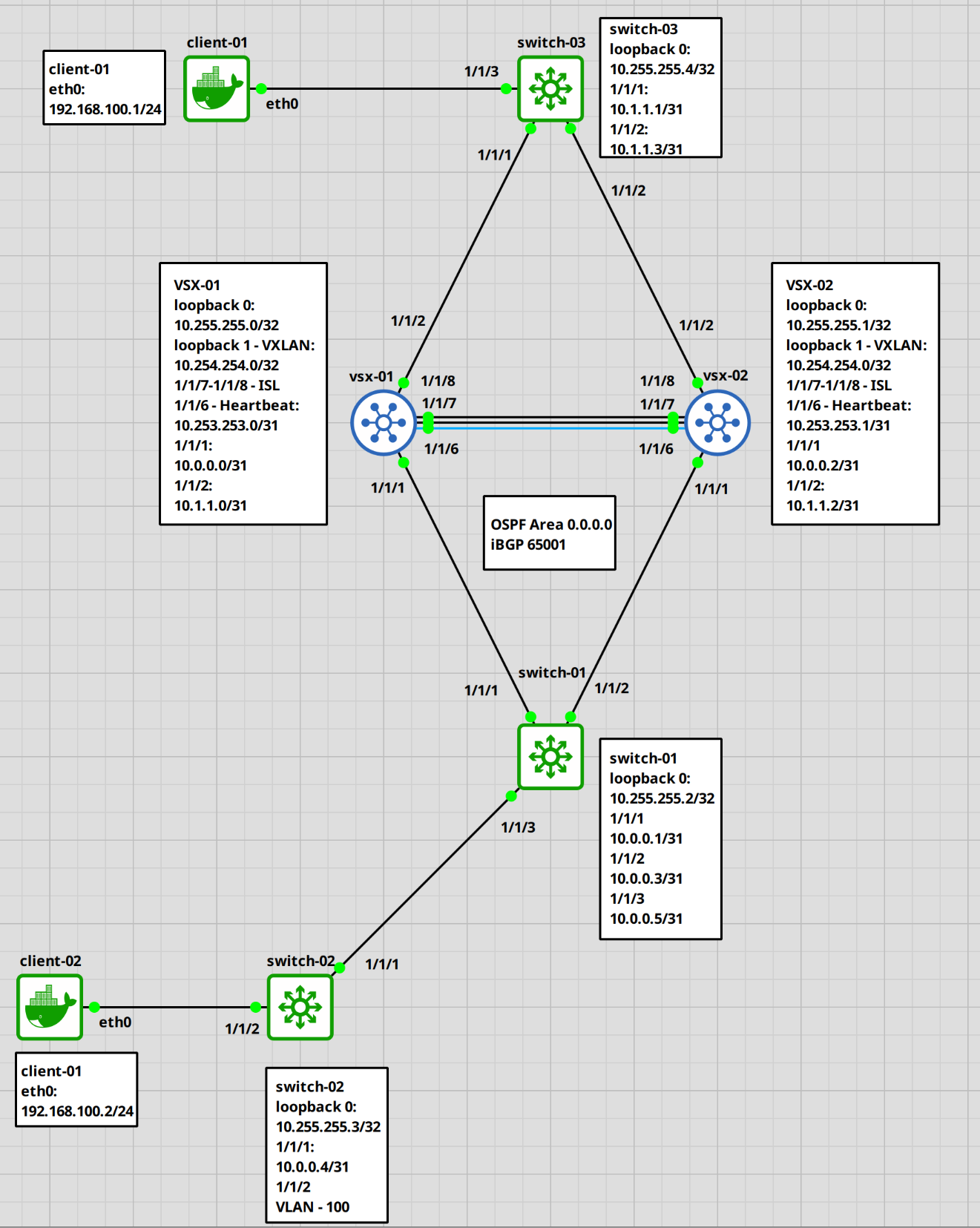
Here a table with the information for each port.
| Hostname | loopback 0 | loopback 1 | 1/1/1 | 1/1/2 | 1/1/3 | 1/1/6 | 1/1/7,1/1/8 | eth0 |
| vsx-01 | 10.255.255.0/32 | 10.254.254.0/32 | 10.0.0.0/31 | 10.1.1.0/31 | ISL | |||
| vsx-02 | 10.255.255.1/32 | 10.254.254.0/32 | 10.0.0.2/31 | 10.1.1.2/31 | ISL | |||
| switch-01 | 10.255.255.2/32 | 10.0.0.1/31 | 10.0.0.3/31 | 10.0.0.5/31 | ||||
| switch-02 | 10.255.255.3/32 | 10.0.0.4/31 | VLAN 100 | |||||
| switch-03 | 10.255.255.4/32 | 10.1.1.1/31 | 10.1.1.3/31 | VLAN 100 | ||||
| client-01 | 192.168.100.1/24 | |||||||
| client-02 | 192.168.100.2/24 |
Let’s begin.
ArubaOS-CX Switch configuration
Setting up vsx-01 and vsx-02
VSX configuration
We will begin with the basic configuration and VSX set up on the “vsx-01″ and “vsx-02″ switches. I won’t go into too much detail on every step, otherwise this post would be several pages long. Also, I already have a post on the VSX configuration. Nothing changed since then (as far as I am aware).
A few important notes.
We need two loopback interfaces. One for the BGP / OSPF layer 3 setup which will be unique to each switch and one for the VXLAN VTEPs which will be the same on both switches.
## vsx-01
# change the hostname
switch# configure terminal
switch(config)# hostname vsx-01
vsx-01(config)#

# configure loopback 0
vsx-01(config)# interface loopback 0
vsx-01(config-loopback-if)# ip address 10.255.255.0/32
vsx-01(config-loopback-if)# ip ospf 1 area 0.0.0.0
vsx-01(config-loopback-if)# description BGP-OSPF
OSPF process does not exist.
Do you want to create (y/n)? y
OSPF Area is not configured.
Do you want to create (y/n)? y
vsx-01(config-loopback-if)# exit

# configure loopback 1 for VXLAN
vsx-01(config)# interface loopback 1
vsx-01(config-loopback-if)# ip address 10.254.254.0/32
vsx-01(config-loopback-if)# ip ospf 1 area 0.0.0.0
vsx-01(config-loopback-if)# description VXLAN-VTEP
vsx-01(config-loopback-if)# exit

# create LAG for ISL
vsx-01(config)# interface lag 128
vsx-01(config-lag-if)# no routing
vsx-01(config-lag-if)# lacp mode active
vsx-01(config-lag-if)# vlan trunk native 1
vsx-01(config-lag-if)# no shutdown
vsx-01(config-lag-if)# exit

# add ports to LAG
vsx-01(config)# interface 1/1/7-1/1/8
vsx-01(config-if-<1/1/7-1/1/8>)# lag 128
vsx-01(config-if-<1/1/7-1/1/8>)# mtu 9198
vsx-01(config-if-<1/1/7-1/1/8>)# no shutdown
vsx-01(config-if-<1/1/7-1/1/8>)# exit

# create VRF for heartbeat
vsx-01(config)# vrf VSX-HEARTBEAT

# configure 1/1/6 for VSX heartbeat
vsx-01(config)# interface 1/1/6
vsx-01(config-if)# vrf attach VSX-HEARTBEAT
vsx-01(config-if)# no shutdown
vsx-01(config-if)# ip address 10.253.253.0/31
vsx-01(config-if)# exit

# configure VSX
vsx-01(config)# vsx
vsx-01(config-vsx)# role primary
vsx-01(config-vsx)# system-mac aa:00:00:00:00:01
vsx-01(config-vsx)# inter-switch-link lag 128
vsx-01(config-vsx)# keepalive peer 10.253.253.1 source 10.253.253.0 vrf VSX-HEARTBEAT
vsx-01(config-vsx)# vsx-sync ospf bgp vsx-global static-routes evpn
Do the same for the second vsx switch, but adjust the IP, the vsx system-mac and role. I marked the relevant parts red.
## vsx-02
# change the hostname
switch# configure terminal
switch(config)# hostname vsx-02
vsx-02(config)#

# configure loopback 0
vsx-02(config)# interface loopback 0
vsx-02(config-loopback-if)# ip address 10.255.255.1/32
vsx-02(config-loopback-if)# ip ospf 1 area 0.0.0.0
vsx-02(config-loopback-if)# description BGP-OSPF
OSPF process does not exist.
Do you want to create (y/n)? y
OSPF Area is not configured.
Do you want to create (y/n)? y
vsx-02(config-loopback-if)# exit

# configure loopback 1 for VXLAN
vsx-02(config)# interface loopback 1
vsx-02(config-loopback-if)# ip address 10.254.254.0/32
vsx-02(config-loopback-if)# ip ospf 1 area 0.0.0.0
vsx-02(config-loopback-if)# description VXLAN-VTEP
vsx-02(config-loopback-if)# exit

# create LAG for ISL
vsx-02(config)# interface lag 128
vsx-02(config-lag-if)# no routing
vsx-02(config-lag-if)# lacp mode active
vsx-02(config-lag-if)# vlan trunk native 1
vsx-02(config-lag-if)# no shutdown
vsx-02(config-lag-if)# exit

# add ports to LAG
vsx-02(config)# interface 1/1/7-1/1/8
vsx-02(config-if-<1/1/7-1/1/8>)# lag 128
vsx-02(config-if-<1/1/7-1/1/8>)# mtu 9198
vsx-02(config-if-<1/1/7-1/1/8>)# no shutdown
vsx-02(config-if-<1/1/7-1/1/8>)# exit

# create VRF for heartbeat
vsx-02(config)# vrf VSX-HEARTBEAT

# configure 1/1/6 for VSX heartbeat
vsx-02(config)# interface 1/1/6
vsx-02(config-if)# vrf attach VSX-HEARTBEAT
vsx-02(config-if)# no shutdown
vsx-02(config-if)# ip address 10.253.253.1/31
vsx-02(config-if)# exit

# configure VSX
vsx-02(config)# vsx
vsx-02(config-vsx)# role secondary
vsx-02(config-vsx)# system-mac aa:00:00:00:00:02
vsx-02(config-vsx)# inter-switch-link lag 128
vsx-02(config-vsx)# keepalive peer 10.253.253.0 source 10.253.253.1 vrf VSX-HEARTBEAT
vsx-02(config-vsx)# vsx-sync ospf bgp vsx-global static-routes evpn
Alright. If everything worked correctly, we should have an established VSX connection.
# check VSX status
vsx-02(config)# show vsx status
VSX Operational State
---------------------
  ISL channel             : In-Sync
  ISL mgmt channel        : operational
  Config Sync Status      : In-Sync
  NAE                     : peer_reachable
  HTTPS Server            : peer_reachable

Attribute           Local               Peer
------------        --------            --------
ISL link            lag128              lag128
ISL version         2                   2
System MAC          aa:00:00:00:00:02   aa:00:00:00:00:01
Platform            X86-64              X86-64
Software Version    Virtual.10.16.1006  Virtual.10.16.1006
Device Role         secondary           primary
Everything is reachable and in sync. Fantastic.
BGP configuration
Let’s continue with the setup. Now we will take a look at the BGP configuration. We will stay on the VSX switches for now.
## vsx-01
# configure BGP
vsx-01(config)# router bgp 65001
vsx-01(config-bgp)# bgp router-id 10.255.255.0

# add switch-01 and switch-03 as a neighbor
vsx-01(config-bgp)# neighbor 10.255.255.2 remote-as 65001
vsx-01(config-bgp)# neighbor 10.255.255.2 update-source loopback 0
vsx-01(config-bgp)# neighbor 10.255.255.4 remote-as 65001
vsx-01(config-bgp)# neighbor 10.255.255.4 update-source loopback 0

# configure l2vpn evpn
vsx-01(config-bgp)# address-family l2vpn evpn
vsx-01(config-bgp-l2vpn-evpn)# neighbor 10.255.255.2 route-reflector-client
vsx-01(config-bgp-l2vpn-evpn)# neighbor 10.255.255.2 send-community extended
vsx-01(config-bgp-l2vpn-evpn)# neighbor 10.255.255.2 activate
vsx-01(config-bgp-l2vpn-evpn)# neighbor 10.255.255.4 route-reflector-client
vsx-01(config-bgp-l2vpn-evpn)# neighbor 10.255.255.4 send-community extended
vsx-01(config-bgp-l2vpn-evpn)# neighbor 10.255.255.4 activate
vsx-01(config-bgp-l2vpn-evpn)# exit-address-family
vsx-01(config-bgp)# exit
vsx-01(config)#
On the vsx-02 switch, we just need to add a few configurations, the rest will be synced from the primary switch.
## vsx-02
# configure BGP
vsx-01(config)# router bgp 65001
vsx-01(config-bgp)# bgp router-id 10.255.255.1

# add the loopback 0 as an update source
vsx-01(config-bgp)# neighbor 10.255.255.2 update-source loopback 0
vsx-01(config-bgp)# neighbor 10.255.255.4 update-source loopback 0
Ok. We are almost done with the VSX switches.
VSX Cluster uplink configuration
Let’s set up the downstream links now.
## vsx-01
# configure interface 1/1/1 to switch-01
vsx-01(config)# interface 1/1/1
vsx-01(config)# no shutdown
vsx-01(config)# ip address 10.0.0.0/31
vsx-01(config)# ip ospf 1 area 0.0.0.0
vsx-01(config)# ip ospf network point-to-point

# configure interface 1/1/2 to switch-03
vsx-01(config)# interface 1/1/2
vsx-01(config)# no shutdown
vsx-01(config)# ip address 10.1.1.0/31
vsx-01(config)# ip ospf 1 area 0.0.0.0
vsx-01(config)# ip ospf network point-to-point
The same on vsx-02.
## vsx-02
# configure interface 1/1/1 to switch-01
vsx-02(config)# interface 1/1/1
vsx-02(config)# no shutdown
vsx-02(config)# ip address 10.0.0.2/31
vsx-02(config)# ip ospf 1 area 0.0.0.0
vsx-02(config)# ip ospf network point-to-point

# configure interface 1/1/2 to switch-03
vsx-02(config)# interface 1/1/2
vsx-02(config)# no shutdown
vsx-02(config)# ip address 10.1.1.2/31
vsx-02(config)# ip ospf 1 area 0.0.0.0
vsx-02(config)# ip ospf network point-to-point
Alright. The last step would be the VXLAN interface and evpn configuration.
VSX cluster VXLAN / EVPN configuration
First, let’s create a VLAN and configure the VXLAN interface.
For the route-target and rd, we could configure them manually, but from what I read, using the “auto” option is the recommended way of setting this up.
I have a simple explanation at the bottom for what the route-target and rd (route distinguisher). But, always check multiple sources for information. This is how I understood it.
## vsx-01
# create vlan 100
vsx-01(config)# vlan 100
vsx-01(config-vlan-100)# exit

# create vxlan 1 interface
vsx-01(config)# interface vxlan 1
vsx-01(config-vxlan-if)# no shutdown
vsx-01(config-vxlan-if)# source ip 10.254.254.0
vsx-01(config-vxlan-if)# vni 100100
vsx-01(config-vni-100100)# vlan 100
vsx-01(config-vni-100100)# exit

# configure evpn
vsx-01(config)# evpn
vsx-01(config-evpn)# vlan 100
vsx-01(config-evpn-vlan-100)# rd auto
vsx-01(config-evpn-vlan-100)# route-target export auto
vsx-01(config-evpn-vlan-100)# route-target import auto
Again. Do the same for the vsx-02 switch. We only need to configure the vxlan 1 interface. The rest will be synced.
## vsx-02
# create vxlan 1 interface
vsx-02(config)# interface vxlan 1
vsx-02(config-vxlan-if)# no shutdown
vsx-02(config-vxlan-if)# source ip 10.254.254.0
vsx-02(config-vxlan-if)# vni 100100
vsx-02(config-vni-100100)# vlan 100
vsx-02(config-vni-100100)# exit
That’s it. We are done with the vsx cluster switches.
Next, we will configure the switch-01 through switch-03.
Setting up switch-01 through switch-03
Base configuration
Ok. We will do the basic setup first.
## switch-01
# set hostname
switch# configure terminal
switch(config)# hostname switch-01

# configure loopback 0
switch-01(config)# interface loopback 0
switch-01(config-loopback-if)# ip address 10.255.255.2/32
switch-01(config-loopback-if)# ip ospf 1 area 0.0.0.0

# configure interfaces 1/1/1 - 1/1/3
# uplink to vsx-01
switch-01(config)# interface 1/1/1
switch-01(config-if)# no shutdown
switch-01(config-if)# ip address 10.0.0.1/31
switch-01(config-if)# ip ospf 1 area 0.0.0.0
switch-01(config-if)# ip ospf network point-to-point

# uplink to vsx-02
switch-01(config)# interface 1/1/2
switch-01(config-if)# no shutdown
switch-01(config-if)# ip address 10.0.0.3/31
switch-01(config-if)# ip ospf 1 area 0.0.0.0
switch-01(config-if)# ip ospf network point-to-point

# uplink to switch-02
switch-01(config)# interface 1/1/3
switch-01(config-if)# no shutdown
switch-01(config-if)# ip address 10.0.0.5/31
switch-01(config-if)# ip ospf 1 area 0.0.0.0
switch-01(config-if)# ip ospf network point-to-point
Verify configuration
Let’s check the connectivity.
## switch-01
# ping vsx-01
switch-01(config)# ping 10.0.0.0
PING 10.0.0.0 (10.0.0.0) 100(128) bytes of data.
108 bytes from 10.0.0.0: icmp_seq=1 ttl=64 time=7.33 ms

# ping vsx-02
switch-01(config)# ping 10.0.0.2
PING 10.0.0.2 (10.0.0.2) 100(128) bytes of data.
108 bytes from 10.0.0.2: icmp_seq=1 ttl=64 time=24.3 ms
We should also see the vsx switches as OSPF neighbors.
## switch-01
# check OSPF neighbor
switch-01(config)# show ip ospf neighbors
VRF : default                          Process : 1
===================================================

Total Number of Neighbors : 2
Neighbor ID      Priority  State             Nbr Address       Interface
-------------------------------------------------------------------------
10.255.255.0     1         FULL             10.0.0.0           1/1/1
10.255.255.1     1         FULL             10.0.0.2           1/1/2
Ok. Now we can setup BGP.
Configure BGP on switch-01
## switch-01
# configure bgp
switch-01(config)# router bgp 65001
switch-01(config-bgp)# bgp router-id 10.255.255.2
switch-01(config-bgp)# neighbor 10.255.255.0 remote-as 65001
switch-01(config-bgp)# neighbor 10.255.255.0 update-source loopback 0
switch-01(config-bgp)# neighbor 10.255.255.1 remote-as 65001
switch-01(config-bgp)# neighbor 10.255.255.1 update-source loopback 0
switch-01(config-bgp)# neighbor 10.255.255.3 remote-as 65001
switch-01(config-bgp)# neighbor 10.255.255.3 update-source loopback 0
switch-01(config-bgp)# address-family l2vpn evpn
switch-01(config-bgp-l2vpn-evpn)# neighbor 10.255.255.0 route-reflector-client
switch-01(config-bgp-l2vpn-evpn)# neighbor 10.255.255.0 send-community extended
switch-01(config-bgp-l2vpn-evpn)# neighbor 10.255.255.0 activate
switch-01(config-bgp-l2vpn-evpn)# neighbor 10.255.255.1 route-reflector-client
switch-01(config-bgp-l2vpn-evpn)# neighbor 10.255.255.1 send-community extended
switch-01(config-bgp-l2vpn-evpn)# neighbor 10.255.255.1 activate
switch-01(config-bgp-l2vpn-evpn)# neighbor 10.255.255.3 route-reflector-client
switch-01(config-bgp-l2vpn-evpn)# neighbor 10.255.255.3 send-community extended
switch-01(config-bgp-l2vpn-evpn)# neighbor 10.255.255.3 activate
switch-01(config-bgp-l2vpn-evpn)# exit-address-family
And the last few steps would be VLAN, EVPN and VXLAN.
Configure EVPN/VXLAN on switch-01
## switch-01
# create vlan 100
switch-01(config)# vlan 100

# create and configure vxlan interface
switch-01(config)# interface vxlan 1
switch-01(config-vxlan-if)# source ip 10.255.255.2
switch-01(config-vxlan-if)# no shutdown
switch-01(config-vxlan-if)# vni 100100
switch-01(config-vni-100100)# vlan 100

# configure evpn
switch-01(config)# evpn
switch-01(config-evpn)# rd auto
switch-01(config-evpn)# route-target export auto
switch-01(config-evpn)# route-target import auto
And that’s that. The other two switches are basically the same setup, with a few differences like the IPs and interfaces.
## switch-02
# set hostname
switch(config)# hostname switch-02

# configure loopback 0
switch-02(config)# interface loopback 0
switch-02(config-if)# ip address 10.255.255.3/32
switch-02(config-if)# ip ospf 1 area 0.0.0.0

# configure interface 1/1/1
switch-02(config-if)# interface 1/1/1
switch-02(config-if)# no shutdown
switch-02(config-if)# ip address 10.0.0.4/31
switch-02(config-if)# ip ospf 1 area 0.0.0.0
switch-02(config-if)# ip ospf network point-to-point

# configure interface 1/1/2 (for client connection)
switch-02(config-if)# interface 1/1/2
switch-02(config-if)# no shutdown
switch-02(config-if)# no routing
switch-02(config-if)# vlan access 100

# bgp configuration
switch-02(config-if)# router bgp 65001
switch-02(config-bgp)# bgp router-id 10.255.255.3
switch-02(config-bgp)# neighbor 10.255.255.2 remote-as 65001
switch-02(config-bgp)# neighbor 10.255.255.2 update-source loopback 0
switch-02(config-bgp)# address-family l2vpn evpn
switch-02(config-bgp-l2vpn-evpn)# neighbor 10.255.255.2 send-community extended
switch-02(config-bgp-l2vpn-evpn)# neighbor 10.255.255.2 activate
switch-02(config-bgp-l2vpn-evpn)# exit

# create vlan
switch-02(config)# vlan 100

# create vxlan interface
switch-02(config)# interface vxlan 1
switch-02(config-vxlan-if)# source ip 10.255.255.3
switch-02(config-vxlan-if)# no shutdown
switch-02(config-vxlan-if)# vni 100100
switch-02(config-vni-100100)# vlan 100
switch-02(config-vni-100100)# exit

# configure evpn
switch-02(config)# evpn
switch-02(config-evpn)# vlan 100
switch-02(config-evpn-vlan-100)# rd auto
switch-02(config-evpn-vlan-100)# route-target export auto
switch-02(config-evpn-vlan-100)# route-target import auto
And switch-03.
## switch-03
# set hostname
switch(config)# hostname switch-03

# configure loopback 0
switch-03(config)# interface loopback 0
switch-03(config-if)# ip address 10.255.255.4/32
switch-03(config-if)# ip ospf 1 area 0.0.0.0

# configure interface 1/1/1 (uplink vsx-01)
switch-03(config-if)# interface 1/1/1
switch-03(config-if)# no shutdown
switch-03(config-if)# ip address 10.1.1.1/31
switch-03(config-if)# ip ospf 1 area 0.0.0.0
switch-02(config-if)# ip ospf network point-to-point

# configure interface 1/1/2 (uplink vsx-02)
switch-03(config-if)# interface 1/1/2
switch-03(config-if)# no shutdown
switch-03(config-if)# ip address 10.1.1.3/31
switch-03(config-if)# ip ospf 1 area 0.0.0.0
switch-02(config-if)# ip ospf network point-to-point

# configure interface 1/1/3 (for client connection)
switch-03(config-if)# interface 1/1/3
switch-03(config-if)# no shutdown
switch-03(config-if)# no routing
switch-03(config-if)# vlan access 100

# bgp configuration
switch-03(config-if)# router bgp 65001
switch-03(config-bgp)# bgp router-id 10.255.255.4
switch-03(config-bgp)# neighbor 10.255.255.0 remote-as 65001
switch-03(config-bgp)# neighbor 10.255.255.0 update-source loopback 0
switch-03(config-bgp)# neighbor 10.255.255.1 remote-as 65001
switch-03(config-bgp)# neighbor 10.255.255.1 update-source loopback 0
switch-03(config-bgp)# address-family l2vpn evpn
switch-03(config-bgp-l2vpn-evpn)# neighbor 10.255.255.0 send-community extended
switch-03(config-bgp-l2vpn-evpn)# neighbor 10.255.255.0 activate
switch-03(config-bgp-l2vpn-evpn)# neighbor 10.255.255.1 send-community extended
switch-03(config-bgp-l2vpn-evpn)# neighbor 10.255.255.1 activate
switch-03(config-bgp-l2vpn-evpn)# exit

# create vlan
switch-03(config)# vlan 100

# create vxlan interface
switch-03(config)# interface vxlan 1
switch-03(config-vxlan-if)# source ip 10.255.255.4
switch-03(config-vxlan-if)# no shutdown
switch-03(config-vxlan-if)# vni 100100
switch-03(config-vni-100100)# vlan 100
switch-03(config-vni-100100)# exit

# configure evpn
switch-03(config)# evpn
switch-03(config-evpn)# vlan 100
switch-03(config-evpn-vlan-100)# rd auto
switch-03(config-evpn-vlan-100)# route-target export auto
switch-03(config-evpn-vlan-100)# route-target import auto
Let’s check the VXLAN VTEPs.
Verify the VXLAN configuration
We can use the “show vteps” command, to list all the vteps discovered.
switch-01(config)# show interface vxlan vteps
Source           Destination      Origin       Status                VNI       Routing   VLAN  VRF
---------------- ---------------- ------------ --------------------- --------- --------- ----- ----------
10.255.255.2     10.254.254.0     evpn         operational           100100    disabled  100    --
10.255.255.2     10.255.255.3     evpn         operational           100100    disabled  100    --
10.255.255.2     10.255.255.4     evpn         operational           100100    disabled  100    --
Ok, we can see the VSX cluster, which is the single IP “10.254.254.0” and the two other switches. Let’s take a look at the evpn info.
switch-01(config)# show bgp l2vpn evpn summary
Codes: * Dynamic Neighbor
VRF : default
BGP Summary
-----------
 Local AS               : 65001        BGP Router Identifier  : 10.255.255.2
 Peers                  : 3            Log Neighbor Changes   : No
 Cfg. Hold Time         : 180          Cfg. Keep Alive        : 60
 Confederation Id       : 0

 Neighbor                                Remote-AS MsgRcvd MsgSent   Up/Down Time State        AdminStatus
 10.255.255.0                            65001       40      46      00h:26m:38s  Established   Up
 10.255.255.1                            65001       43      46      00h:26m:38s  Established   Up
 10.255.255.3                            65001       38      43      00h:26m:40s  Established   Up
As a last test, we will assign ip addresses to the clients and test the connectivity.
Test the setup
Now, let’s assign the IPs to the clients. These are linux clients, adjust the commands acordingly if you should use different systems.
Set client IP
## client-01
# assign IP
client-01 :: ~ » ifconfig eth0 192.168.100.1/24
client-01 :: ~ » ifconfig eth0
eth0      Link encap:Ethernet  HWaddr d6:3b:e1:92:14:2f
          inet addr:192.168.100.1  Bcast:192.168.100.255  Mask:255.255.255.0
          inet6 addr: fe80::d43b:e1ff:fe92:142f/64 Scope:Link
          UP BROADCAST RUNNING MULTICAST  MTU:1500  Metric:1
          RX packets:93 errors:0 dropped:69 overruns:0 frame:0
          TX packets:26 errors:0 dropped:0 overruns:0 carrier:0
          collisions:0 txqueuelen:1000
          RX bytes:14870 (14.8 KB)  TX bytes:2056 (2.0 KB)
## client-02
# assign IP
client-02 :: ~ » ifconfig eth0 192.168.100.2/24
client-02 :: ~ » ifconfig eth0
eth0      Link encap:Ethernet  HWaddr 12:09:9c:54:2f:02
          inet addr:192.168.100.2  Bcast:192.168.100.255  Mask:255.255.255.0
          inet6 addr: fe80::1009:9cff:fe54:2f02/64 Scope:Link
          UP BROADCAST RUNNING MULTICAST  MTU:1500  Metric:1
          RX packets:91 errors:0 dropped:68 overruns:0 frame:0
          TX packets:24 errors:0 dropped:0 overruns:0 carrier:0
          collisions:0 txqueuelen:1000
          RX bytes:14614 (14.6 KB)  TX bytes:1860 (1.8 KB)
Take a note of the mac address. We will check that later. Now we ping the peer.
Ping the peer client
## client-01
# ping client-02
client-01 :: ~ » ping 192.168.100.2
PING 192.168.100.2 (192.168.100.2) 56(84) bytes of data.
64 bytes from 192.168.100.2: icmp_seq=1 ttl=64 time=14.0 ms
64 bytes from 192.168.100.2: icmp_seq=2 ttl=64 time=15.1 ms
64 bytes from 192.168.100.2: icmp_seq=3 ttl=64 time=24.1 ms
Alright, we can take a look at the mac address table.
verify the mac addresses
switch-01(config)# show mac-address-table
MAC age-time            : 300 seconds
Number of MAC addresses : 2

MAC Address          VLAN     Type                      Port
--------------------------------------------------------------
12:09:9c:54:2f:02    100      evpn                      vxlan1(10.255.255.3)
d6:3b:e1:92:14:2f    100      evpn                      vxlan1(10.255.255.4)
These are the two clients. We can also check this via the “show evpn” command.
switch-01(config)# show evpn mac-ip
Flags:  Local(L), Remote(R), Sticky bit(S)

EVI      MAC               IP                                      Next-hop                                        Seq-Num   Flags
----------------------------------------------------------------------------------------------------------------------------------
100100   12:09:9c:54:2f:02                                         vxlan1(10.255.255.3)                            0         R
100100   d6:3b:e1:92:14:2f                                         vxlan1(10.255.255.4)                            0         R

MACs           : 2
Remote MACs    : 2
Let’s take a look at, what it looks like on one of the edge switches.
switch-02(config)# show evpn mac-ip
Flags:  Local(L), Remote(R), Sticky bit(S)

EVI      MAC               IP                                      Next-hop                                        Seq-Num   Flags
----------------------------------------------------------------------------------------------------------------------------------
100100   12:09:9c:54:2f:02                                                                                         0         L
100100   d6:3b:e1:92:14:2f                                         vxlan1(10.255.255.4)                            0         R

MACs           : 2
Remote MACs    : 1
Here we can see that one of the clients is locally connected (marked red).
Add IP to VLAN on switch-03
If you are wondering, why the IP wont show up even though the column exists. We need at least one interface on the VLAN on one of the edge switches. Here an example.
## switch-03
# configure vlan 100 interface
switch-03(config)# interface vlan 100
switch-03(config-if-vlan)# ip address 192.168.100.253/24
switch-03(config-if-vlan)# exit

# Ping one of the clients
switch-03(config)# ping 192.168.100.1
PING 192.168.100.1 (192.168.100.1) 100(128) bytes of data.
108 bytes from 192.168.100.1: icmp_seq=1 ttl=64 time=20.9 ms
Let’s check the evpn mac-ip again.
switch-03(config)# show evpn mac-ip
Flags:  Local(L), Remote(R), Sticky bit(S)

EVI      MAC               IP                                      Next-hop                                        Seq-Num   Flags
----------------------------------------------------------------------------------------------------------------------------------
100100   12:09:9c:54:2f:02                                         vxlan1(10.255.255.3)                            0         R
100100   d6:3b:e1:92:14:2f                                                                                         0         L
100100   d6:3b:e1:92:14:2f 192.168.100.1                                                                           0         L

MACs           : 2
Remote MACs    : 1
We can also see this on the other switches.
vsx-01(config)# show evpn mac-ip
Flags:  Local(L), Remote(R), Sticky bit(S)

EVI      MAC               IP                                      Next-hop                                        Seq-Num   Flags
----------------------------------------------------------------------------------------------------------------------------------
100100   12:09:9c:54:2f:02                                         vxlan1(10.255.255.3)                            0         R
100100   d6:3b:e1:92:14:2f                                         vxlan1(10.255.255.4)                            0         R
100100   d6:3b:e1:92:14:2f 192.168.100.1                           vxlan1(10.255.255.4)                            0         R

MACs           : 2
Remote MACs    : 2
Great. We set up a VSX cluster, configured OSPF and BGP and created VXLAN interfaces, providing a layer 2 abstraction in a layer 3 network.
There is a lot of configuration required, to get this up and running, but once it’s done, its quite nice. It workes basically flawlessly, but it’s a lab. So yeah.
Here a quick explanation for a few of the terminologies.
Route Distingusher (RD)
The Idea of the RD is to separate otherwise identical routes. For example, we could have multiple VRFs with the same VLAN and the same IP subnet. The RD allows us, to keep them unique.Route Target (RT)
The RTs job is it, to tag the BGP routes, it attaches an Export Route Target to that route before advertising it to other VTEPs via BGP EVPN. This tag identifies the “community” or virtual network the route belongs to.For the import side. The receiving switch, checks the receiving routes RT against its local import RT list, to make sure that the traffic is forwarded for that network. If it fails, the switch ignores the route.
Switch configuration output
And here the plain configuration for each switch
vsx-01
ssh server vrf mgmt
vlan 1
vlan 100
    vsx-sync
interface mgmt
    no shutdown
    ip dhcp
interface lag 1 multi-chassis
    no routing
    vlan access 1
    lacp mode active
interface lag 128
    no shutdown
    no routing
    vlan trunk native 1
    vlan trunk allowed all
    lacp mode active
interface 1/1/1
    no shutdown
    mtu 9198
    ip mtu 9198
    ip address 10.0.0.0/31
    ip ospf 1 area 0.0.0.0
    ip ospf network point-to-point
interface 1/1/2
    no shutdown
    mtu 9198
    ip mtu 9198
    ip address 10.1.1.0/31
    ip ospf 1 area 0.0.0.0
    ip ospf network point-to-point
interface 1/1/6
    no shutdown
    vrf attach VSX-HEARTBEAT
    ip address 10.253.253.0/31
interface 1/1/7
    no shutdown
    mtu 9198
    lag 128
interface 1/1/8
    no shutdown
    mtu 9198
    lag 128
interface loopback 0
    description BGP-OSPF
    ip address 10.255.255.0/32
    ip ospf 1 area 0.0.0.0
interface loopback 1
    description VXLAN-VTEP
    ip address 10.254.254.0/32
    ip ospf 1 area 0.0.0.0
interface vxlan 1
    source ip 10.254.254.0
    no shutdown
    vni 100100
        vlan 100
vsx
    system-mac aa:00:00:00:00:01
    inter-switch-link lag 128
    role primary
    keepalive peer 10.253.253.1 source 10.253.253.0 vrf VSX-HEARTBEAT
    no split-recovery
    vsx-sync bgp evpn lldp neighbor ospf static-routes vsx-global
!
!
!
!
!
router ospf 1
    area 0.0.0.0
router bgp 65001
    bgp router-id 10.255.255.0
    neighbor 10.255.255.2 remote-as 65001
    neighbor 10.255.255.2 update-source loopback 0
    neighbor 10.255.255.4 remote-as 65001
    neighbor 10.255.255.4 update-source loopback 0
    address-family l2vpn evpn
        neighbor 10.255.255.2 route-reflector-client
        neighbor 10.255.255.2 send-community extended
        neighbor 10.255.255.2 activate
        neighbor 10.255.255.4 route-reflector-client
        neighbor 10.255.255.4 send-community extended
        neighbor 10.255.255.4 activate
    exit-address-family
!
https-server vrf mgmt
vsx-02
ssh server vrf mgmt
vlan 1
vlan 100
    vsx-sync
evpn
    vlan 100
        rd auto
        route-target export auto
        route-target import auto
interface mgmt
    no shutdown
    ip dhcp
interface lag 128
    no shutdown
    no routing
    vlan trunk native 1
    vlan trunk allowed all
    lacp mode active
interface 1/1/1
    no shutdown
    mtu 9198
    ip mtu 9198
    ip address 10.0.0.2/31
    ip ospf 1 area 0.0.0.0
    ip ospf network point-to-point
interface 1/1/2
    no shutdown
    mtu 9198
    ip mtu 9198
    ip address 10.1.1.2/31
    ip ospf 1 area 0.0.0.0
    ip ospf network point-to-point
interface 1/1/6
    no shutdown
    vrf attach VSX-HEARTBEAT
    ip address 10.253.253.1/31
interface 1/1/7
    no shutdown
    mtu 9198
    lag 128
interface 1/1/8
    no shutdown
    mtu 9198
    lag 128
interface loopback 0
    description BGP-OSPF
    ip address 10.255.255.1/32
    ip ospf 1 area 0.0.0.0
interface loopback 1
    description VXLAN-VTEP
    ip address 10.254.254.0/32
    ip ospf 1 area 0.0.0.0
interface vxlan 1
    source ip 10.254.254.0
    no shutdown
    vni 100100
        vlan 100
vsx
    system-mac aa:00:00:00:00:01
    inter-switch-link lag 128
    role secondary
    keepalive peer 10.253.253.0 source 10.253.253.1 vrf VSX-HEARTBEAT
    no split-recovery
    vsx-sync bgp evpn lldp neighbor ospf static-routes vsx-global
!
!
!
!
!
router ospf 1
    area 0.0.0.0
router bgp 65001
    bgp router-id 10.255.255.1
    neighbor 10.255.255.2 remote-as 65001
    neighbor 10.255.255.2 update-source loopback 0
    neighbor 10.255.255.4 remote-as 65001
    neighbor 10.255.255.4 update-source loopback 0
    address-family l2vpn evpn
        neighbor 10.255.255.2 route-reflector-client
        neighbor 10.255.255.2 send-community extended
        neighbor 10.255.255.2 activate
        neighbor 10.255.255.4 route-reflector-client
        neighbor 10.255.255.4 send-community extended
        neighbor 10.255.255.4 activate
    exit-address-family
!
https-server vrf mgmt
switch-01
ssh server vrf mgmt
vlan 1,100
evpn
    vlan 100
        rd auto
        route-target export auto
        route-target import auto
interface mgmt
    no shutdown
    ip dhcp
interface 1/1/1
    no shutdown
    mtu 9198
    ip mtu 9198
    ip address 10.0.0.1/31
    ip ospf 1 area 0.0.0.0
    ip ospf network point-to-point
interface 1/1/2
    no shutdown
    mtu 9198
    ip mtu 9198
    ip address 10.0.0.3/31
    ip ospf 1 area 0.0.0.0
    ip ospf network point-to-point
interface 1/1/3
    no shutdown
    mtu 9198
    ip mtu 9198
    ip address 10.0.0.5/31
    ip ospf 1 area 0.0.0.0
    ip ospf network point-to-point
interface loopback 0
    ip address 10.255.255.2/32
    ip ospf 1 area 0.0.0.0
interface vxlan 1
    source ip 10.255.255.2
    no shutdown
    vni 100100
        vlan 100
!
!
!
!
!
router ospf 1
    area 0.0.0.0
router bgp 65001
    bgp router-id 10.255.255.2
    neighbor 10.255.255.0 remote-as 65001
    neighbor 10.255.255.0 update-source loopback 0
    neighbor 10.255.255.1 remote-as 65001
    neighbor 10.255.255.1 update-source loopback 0
    neighbor 10.255.255.3 remote-as 65001
    neighbor 10.255.255.3 update-source loopback 0
    address-family l2vpn evpn
        neighbor 10.255.255.0 route-reflector-client
        neighbor 10.255.255.0 send-community extended
        neighbor 10.255.255.0 activate
        neighbor 10.255.255.1 route-reflector-client
        neighbor 10.255.255.1 send-community extended
        neighbor 10.255.255.1 activate
        neighbor 10.255.255.3 route-reflector-client
        neighbor 10.255.255.3 send-community extended
        neighbor 10.255.255.3 activate
    exit-address-family
!
https-server vrf mgmt
switch-02
ssh server vrf mgmt
vlan 1,100
evpn
    vlan 100
        rd auto
        route-target export auto
        route-target import auto
interface mgmt
    no shutdown
    ip dhcp
interface 1/1/1
    no shutdown
    mtu 9198
    ip mtu 9198
    ip address 10.0.0.4/31
    ip ospf 1 area 0.0.0.0
    ip ospf network point-to-point
interface 1/1/2
    no shutdown
    no routing
    vlan access 100
interface loopback 0
    ip address 10.255.255.3/32
    ip ospf 1 area 0.0.0.0
interface vxlan 1
    source ip 10.255.255.3
    no shutdown
    vni 100100
        vlan 100
!
!
!
!
!
router ospf 1
    area 0.0.0.0
router bgp 65001
    bgp router-id 10.255.255.3
    neighbor 10.255.255.2 remote-as 65001
    neighbor 10.255.255.2 update-source loopback 0
    address-family l2vpn evpn
        neighbor 10.255.255.2 send-community extended
        neighbor 10.255.255.2 activate
    exit-address-family
!
https-server vrf mgmt
switch-03
ssh server vrf mgmt
vlan 1,100
evpn
    vlan 100
        rd auto
        route-target export auto
        route-target import auto
interface mgmt
    no shutdown
    ip dhcp
interface 1/1/1
    no shutdown
    mtu 9198
    ip mtu 9198
    ip address 10.1.1.1/31
    ip ospf 1 area 0.0.0.0
    ip ospf network point-to-point
interface 1/1/2
    no shutdown
    mtu 9198
    ip mtu 9198
    ip address 10.1.1.3/31
    ip ospf 1 area 0.0.0.0
    ip ospf network point-to-point
interface 1/1/3
    no shutdown
    no routing
    vlan access 100
interface loopback 0
    ip address 10.255.255.4/32
    ip ospf 1 area 0.0.0.0
interface vlan 100
    ip address 192.168.100.253/24
interface vxlan 1
    source ip 10.255.255.4
    no shutdown
    vni 100100
        vlan 100
!
!
!
!
!
router ospf 1
    area 0.0.0.0
router bgp 65001
    bgp router-id 10.255.255.4
    neighbor 10.255.255.0 remote-as 65001
    neighbor 10.255.255.0 update-source loopback 0
    neighbor 10.255.255.1 remote-as 65001
    neighbor 10.255.255.1 update-source loopback 0
    address-family l2vpn evpn
        neighbor 10.255.255.0 send-community extended
        neighbor 10.255.255.0 activate
        neighbor 10.255.255.1 send-community extended
        neighbor 10.255.255.1 activate
    exit-address-family
!
https-server vrf mgmt
Hopefully this was helpful to you, it was a lot of fun for me and a good learning experience .
Thanks and till next time.